
Why Do Most Engineering Leaders Get Their Remote Team Tools Stack Wrong?
89+ SaaS applications run inside the average enterprise today, according to Okta’s 2025 Businesses at Work report. Yet engineering teams report more collaboration friction than they did three years ago, not less. If tools alone solved distributed engineering challenges, the problem would already be solved. You have the tools. What you lack is architecture.
A 2023 Hubstaff survey of 500 engineering leaders puts the symptoms in rank order: maintaining team cohesion and culture (48%), ensuring effective communication across time zones (45%), accurately assessing developer productivity (39%), onboarding new hires effectively (35%), and preventing burnout and isolation (31%). Every one of these is a tool-misalignment problem. Each signals that the stack grew reactively instead of by design.
23 minutes is the average recovery time after a single context switch, per University of California, Irvine research led by Gloria Mark. A developer toggling between Slack, Jira, GitHub, Notion, and a video call five times in a morning loses nearly two hours of deep work before lunch. Scale that across a 40-person distributed engineering team and you burn 80 engineer-hours per day on cognitive re-entry, not engineering.
Treat your collaboration stack the way you would treat a system design problem. Define the inputs, outputs, handoffs, and async-to-sync ratios before you evaluate a single vendor. The goal is not fewer tools. It is fewer seams between tools. For the management layer on top of this stack, our guide to how to manage a remote team covers the operating rhythms that make these tools earn their keep.
Why Do Leading Tools Fail Without a Collaboration Architecture?
Slack, Jira, and Notion are each leaders in their category. Each one will also actively degrade your team’s performance without a deliberate operating framework:
- Slack creates “always-on” culture and notification fatigue. Important context disappears into fast-moving channels within hours. Mitigation: Enforce channel-over-DM norms, mandatory threading, and Scheduled Send for cross-timezone messages.
- Jira’s complex UI turns ticket management into overhead developers resent. Mitigation: Pre-configure board-level workflows, constrain field options, and build automation rules that eliminate manual triage.
- Notion’s flexibility becomes a liability at scale, with steep learning curves and an “empty maze” effect where documentation exists but no one can find it. Mitigation: Assign a documentation owner, enforce template usage, and run quarterly audits.
Define your async communication norms, meeting cadence, and documentation standards first. Then select tools that enforce those norms structurally. You are not building a tool list. You are building a collaboration operating system.
GitLab operationalized this with its handbook-first culture, documented publicly in the GitLab Handbook: every process lives in a single searchable document, and no decision is valid unless the handbook records it. Zapier, a fully distributed company with significant engineering presence in Argentina, Colombia, and Brazil, proves the model scales with nearshore teams. CEO Wade Foster frames it clearly in Zapier’s remote-work guide: “Time zones are a bigger deal than geography.” That process-first decision shaped hiring, which shaped workflow architecture, which then determined tool configuration. Per Zapier’s published remote operations data, that discipline supports 95% annual retention and a 40% reduction in time-to-hire.
The nearshore integration pattern reinforces this point. Leading nearshore providers cite the same critical success factor in their published delivery models: nearshore engineers must plug directly into existing US-based toolchains, the same Slack channels, the same Jira boards, the same CI/CD pipelines. When you create a separate “offshore team” workspace, you create a communication silo by design. Architecture of tool use matters more than tool selection.
What Changes When Your Distributed Team Spans 3+ Time Zones?
4 hours of synchronous overlap is the minimum threshold for high-bandwidth collaboration activities like pair programming and sprint planning, per GitLab’s Guide to All-Remote and the Microsoft Work Trend Index (2023). Latin American engineering talent delivers 5 to 8 hours of daily overlap with US time zones. Offshore regions cannot match this.
| Region/City | UTC Offset | Overlap with PT | Overlap with ET | Suitability |
|---|---|---|---|---|
| Mexico City | UTC-6 | 8h | 7h | Excellent |
| Bogotá / Lima | UTC-5 | 7h | 6h | Excellent |
| Santiago | UTC-4 | 6h | 7h | Excellent |
| Buenos Aires / São Paulo | UTC-3 | 5h | 8h | Excellent |
| Poland / Romania | UTC+2 | 1-3h | 1-3h | Limited |
| India | UTC+5:30 | 0-1h | 0-1h | Minimal |
| Philippines | UTC+8 | 0h | 0h | None |
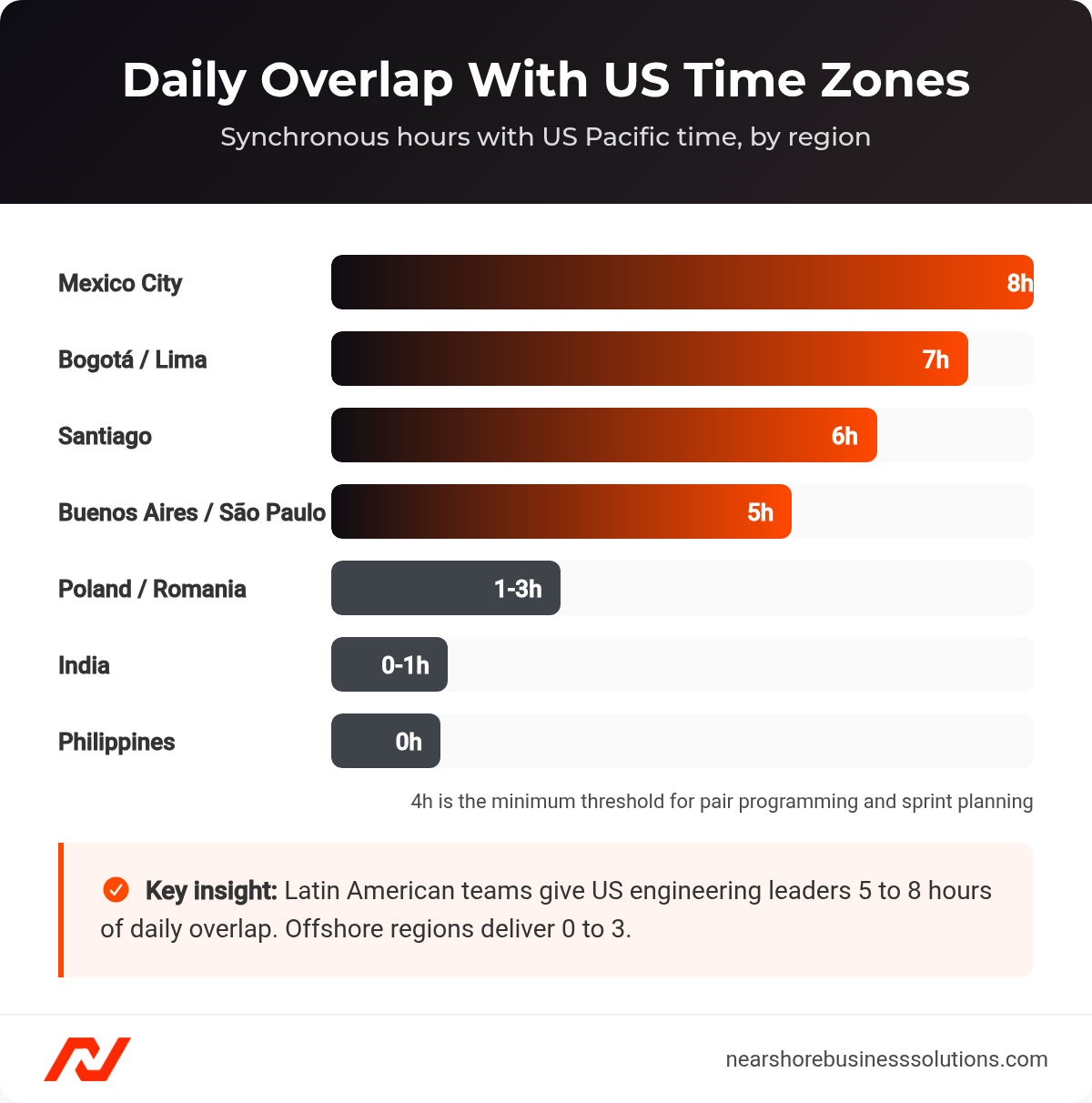
Daily synchronous overlap with US time zones by region, from Mexico City to the Philippines.
An Accenture 2022 study on distributed agile teams quantified the impact: teams with more than four hours of overlap had 30% shorter code review turnaround times and 15% higher sprint goal achievement rates, according to Accenture’s published findings. That gap does not shrink with better tools. It is a physics constraint.
For a US-based engineering leader working with a nearshore team in Latin America, this means you can run full Agile ceremonies synchronously, resolve blocking issues in real time, and still give both sides three to four hours of uninterrupted deep work. Your async tooling covers the margins, not the core collaboration rhythm.
What Are the Best Remote Collaboration Tools for Engineering Teams in 2026?
Six tools cover the entire collaboration surface for a distributed engineering team. Slack handles real-time and async text communication, Zoom handles synchronous video, Notion handles knowledge management, Loom handles async video messaging, Jira handles Agile project management, and Miro handles visual collaboration. The right configuration of these six, not the tools themselves, determines whether your distributed team operates as one integrated org or two disconnected halves.
| Tool | Primary Function | Async/Sync | Price/user/mo | Annual (100 users) |
|---|---|---|---|---|
| Slack | Text communication | Both | $12.50 | $15,000 |
| Zoom | Video meetings | Sync | $16.66/host | $3,998 (20 hosts) |
| Notion | Knowledge base | Async | $15.00 | $18,000 |
| Loom | Async video | Async | $12.50 | $15,000 |
| Jira | Project management | Both | $8.15 | $9,780 |
| Miro | Visual collaboration | Both | $16.00 | $19,200 |
| Total | $67.50/mo | ~$810/dev/year |
$810 per developer per year, calculated from the per-tool list pricing above, is 0.38% of average US developer cost ($211,250 per Glassdoor and BLS composite) and 1.11% of average LATAM developer cost (an estimated $73,000). The tooling investment is rounding error relative to compensation.
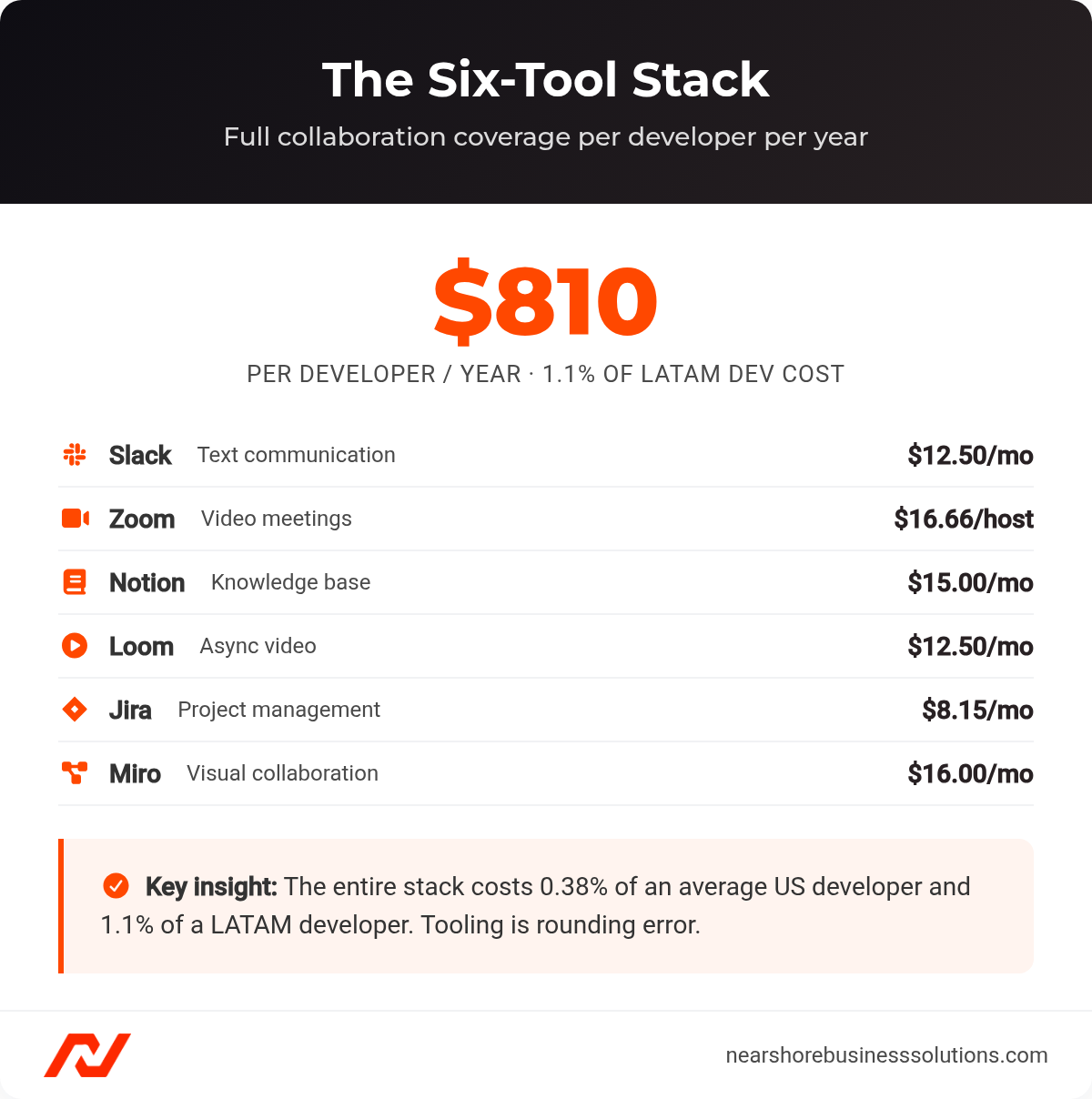
The six-tool collaboration stack and its annual per-developer cost.
How Should You Use Async Tools: Slack, Loom, and Notion?
A University of North Carolina study found that shifting status updates to asynchronous channels eliminates 3 to 5 hours of meetings per employee per week. For a 100-person org, that is 300 to 500 hours reclaimed weekly. Pairing async discipline with the habits in our remote work productivity tips compounds that reclaimed time into shipped work.
Slack serves over 200,000 paid customers, with engineering team penetration exceeding 70% per Slack’s own customer reporting. A Forrester Total Economic Impact study quantified disciplined Slack usage: 20% reduction in meetings, 9% faster project completion, and 455% ROI over three years. Three structural rules matter: channels over DMs (every discussion in a named channel like #proj-payments-api), mandatory threading, and Scheduled Send for time-zone awareness. Huddles handle quick unblocking, and Clips provide async audio and video updates without leaving channel context.
Loom reaches 21 million users across 350,000 companies, with engineering as the fastest-growing segment per Loom’s published metrics. Users reduce meeting time by 29% according to Loom’s customer surveys. A HubSpot case study showed 57% faster ticket resolution through recorded walkthroughs. The cross-timezone value is concrete: a São Paulo engineer records a seven-minute code walkthrough at their end of day, their US-based lead reviews it the next morning with time-stamped feedback, and the loop closes in under 12 hours, versus 24+ hours with offshore teams at zero overlap.
Notion serves over 30 million active users with 50%+ penetration in startups and mid-market tech companies, per Notion’s company reporting. Teams report a 30 to 50% reduction in “where do I find…” questions in Notion’s published customer data. For nearshore engineering teams, Notion solves the most expensive distributed work problem: context availability at the start of the workday. A well-structured spec with acceptance criteria, architecture decision records, and linked Figma mocks lets a LATAM engineer begin productive work immediately without waiting for their US counterpart to come online.
How Should You Use Sync Tools: Zoom, Jira, and Miro?
Synchronous time is your scarcest resource. Waste the 5 to 8 hour nearshore overlap window on status updates and you have squandered nearshore’s single biggest advantage. Target two to three structured sync rituals per week per pod. Everything else runs async.
Zoom serves 213,000 enterprise customers per Zoom’s investor reporting. A Metrigy report found 72% improvement in employee engagement and a $1,527 per-user annual productivity gain. But Zoom fatigue is clinically documented: Stanford’s Virtual Human Interaction Lab identified four specific causes in its 2021 research. The fix is architectural. Sprint planning, retrospectives, incident resolution, and pair programming happen on Zoom. Which sessions earn live time is only half the battle; how people behave once the call starts is where online meeting etiquette pays off. Status updates, code reviews, and demo walkthroughs go async. At $16.66 per month per host, twenty licenses cover a 100-person team for $3,998 per year.
Jira is used by 53.5% of professional developers, per the Stack Overflow 2023 Developer Survey of 90,000 respondents. Teams using Jira’s roadmapping features are 88% more likely to report projects as successful, according to Atlassian’s customer research. Jira answers the question every distributed team needs answered: What is each person working on, and what is blocked? Cross-timezone automation rules can route bug reports filed after 5:00 PM ET to LATAM engineers starting their day. Integration depth makes Jira the stack’s connective tissue, with two-way Slack sync, embedded Notion pages, attached Loom videos, and linked Miro boards.
Miro reaches 60 million users and 99% of the Fortune 100, per Miro’s company reporting. A Forrester Total Economic Impact study found 20% improvement in time-to-market and a $4.9 million productivity gain over three years. Miro fills the gap text tools cannot: spatial reasoning for system design, event storming, and story mapping. The async-sync flexibility is key, with synchronous design during overlap windows, then asynchronous voting and comments for team members who join later.
How Should a VP Engineering Evaluate Collaboration Software for Remote Teams?
Feature parity across modern SaaS is near-universal, so feature comparison produces no signal. Use this four-layer framework instead:
1. Async Capacity. Can the tool deliver full functionality when zero teammates are online? Test it. Assign a real task to a trial user in a different time zone, prohibit synchronous communication for 48 hours, and measure whether work stalls. If it does, the tool fails.
2. Integration Depth. Does the tool connect through native, maintained integrations or require middleware? Map every cross-tool data flow. Any critical flow requiring custom middleware fails this layer. Jira functions as the central hub, with bidirectional sync with Slack, embedded Loom videos, linked Notion pages, and connected Miro boards.
3. Onboarding Speed. Can a new nearshore engineer reach productive usage within 48 hours? With 35% of engineering leaders citing onboarding as a top challenge in the 2023 Hubstaff survey, tool onboarding speed is the largest controllable variable. Test with written guidance only, no live walkthrough.
4. Security Posture. SOC 2 Type II, SAML SSO, enforced MFA, and audit logging are pass/fail. All six recommended tools meet this threshold at Business tier.
Should You Buy, Build, or Bundle Your Stack?
Microsoft 365 E5 costs $57 per user per month and Google Workspace Enterprise costs $20 to $30 per user per month, per each vendor’s published pricing. Both promise a single-vendor suite. For engineering teams, the reality is mediocrity at every layer. Teams lacks Slack’s threading discipline, Planner lacks Jira’s sprint analytics, and Loop lacks Notion’s database architecture. When every individual selection favors the leading point tool, the bundle’s only remaining advantage, administrative simplicity, fails to justify the compounded productivity cost.
A Forrester Total Economic Impact study on Atlassian alone found 373% three-year ROI, with $4.8 million in development productivity gains and 15% improvement in time-to-market. The best-of-breed stack at $810 per developer per year delivers returns that bundled platforms cannot match for engineering workflows.
Frequently Asked Questions
How do you roll out a new collaboration stack without tanking productivity?
Every tool migration carries a productivity dip, so never go org-wide on a calendar-driven schedule. Pilot the new tool with one pod or squad first to limit blast radius, instrument adoption metrics from day one (daily active users, message volume, Jira hygiene scores, Notion page freshness), and expand only when the pilot hits its thresholds. For nearshore teams, embed a “tool champion” inside the LATAM pod to drive local adoption and surface friction in-timezone.
Can you run this six-tool stack on free tiers to save money?
Free tiers fail the moment your stack needs the things that actually matter for distributed engineering: SOC 2 Type II, SAML SSO, enforced MFA, and audit logging are pass/fail enterprise requirements that all six tools only meet at Business tier. The full paid stack runs roughly $810 per developer per year, which is 0.38% of average US developer cost and 1.11% of average LATAM developer cost (per Glassdoor and BLS; the LATAM figure is an estimate). The tooling spend is a rounding error, so optimize for capability and security, not for shaving the subscription line item.
How do you keep nearshore engineers from becoming a siloed “offshore team”?
Plug them directly into your existing toolchains, the same Slack channels, the same Jira boards, the same CI/CD pipelines that your US engineers already use, rather than spinning up a separate workspace. Leading nearshore providers cite this single integration pattern as the critical success factor in their published delivery models. The moment you create a parallel “offshore team” workspace, you have engineered a communication silo by design.
How many synchronous meetings should a distributed pod actually hold each week?
Target two to three structured sync rituals per week per pod, and run everything else asynchronously. Sprint planning, retrospectives, incident resolution, and pair programming earn the live Zoom time during your 5 to 8 hour nearshore overlap window. Status updates, code reviews, and demo walkthroughs move to Slack, Loom, and Notion, which is why shifting status updates to async channels reclaims 3 to 5 hours of meetings per employee per week (per a University of North Carolina study).
Does Notion’s flexibility justify the steep learning curve for distributed teams?
It does, but only if you govern it, because Notion’s flexibility becomes an “empty maze” at scale where documentation exists but no one can find it. Assign a documentation owner, enforce template usage, and run quarterly audits to keep the knowledge base usable. Done right, Notion solves the most expensive distributed work problem, context availability at the start of the workday, and teams report a 30 to 50% reduction in “where do I find…” questions (per Notion’s published customer data).
Ready to Build a Distributed Engineering Team That Actually Ships?
Nearshore Business Solutions sources and vets engineers across Mexico City, Bogotá, Buenos Aires, and São Paulo who plug directly into your existing Slack, Jira, and CI/CD stack from day one. We screen for technical skills, English fluency, US work-style fit, and the 5 to 8 hour time-zone overlap that makes synchronous Agile ceremonies possible.
Every placement includes a 90-day replacement guarantee, and you receive your first pre-vetted candidates within 3 business days. If you want the operating model and tool architecture designed alongside the team, our nearshore team implementation program builds both together.
Start building your nearshore engineering team to discuss your hiring needs and receive a custom quote.