
Unnecessary meetings cost the average 100-employee company $2.5 million per year, yet most distributed teams operate without a single written rule governing when, how, or whether to meet. This guide delivers the playbook for virtual meeting etiquette in 2026. It covers async-first decision frameworks, enforceable rules, and cross-cultural norms that HR leads and engineering managers need to protect deep work across US-LATAM teams.
Why Does Virtual Meeting Etiquette Still Break Down in 2026?
Meeting volume has outpaced the norms meant to govern it. According to Microsoft’s Work Trend Index, Teams users now spend 3x more time in meetings than in February 2020, and software engineers sit through 11 to 15 meetings per week. Yet the norm governing most calls remains “just be professional,” a directive so vague it produces wildly inconsistent behavior across time zones, cultures, and seniority levels.
The scale of remote work makes informality unsustainable. Data from WFH Research and Upwork puts roughly 32.6 million Americans working remotely as of 2025, and 98% of knowledge workers say they want remote options permanently. When a 200-person distributed team spans four LATAM countries and three US offices, informal norms compound into systemic drag: misaligned camera expectations, redundant status syncs, and calendar gridlock that erodes deep-work capacity by up to 25%.
The cost is concrete. Research summarized by Atlassian and Harvard Business Review estimates knowledge workers burn 157 hours per year in meetings that should never have been scheduled, and the average employee spends roughly $15,000 worth of salary time annually in status-update meetings alone. Shopify’s 2023 meeting purge, which eliminated all recurring meetings with more than two people, cleared 322,000 hours in Q1, produced a 15% increase in engineering projects shipped, and a 22% rise in employee satisfaction with productivity, per the company’s own reporting.
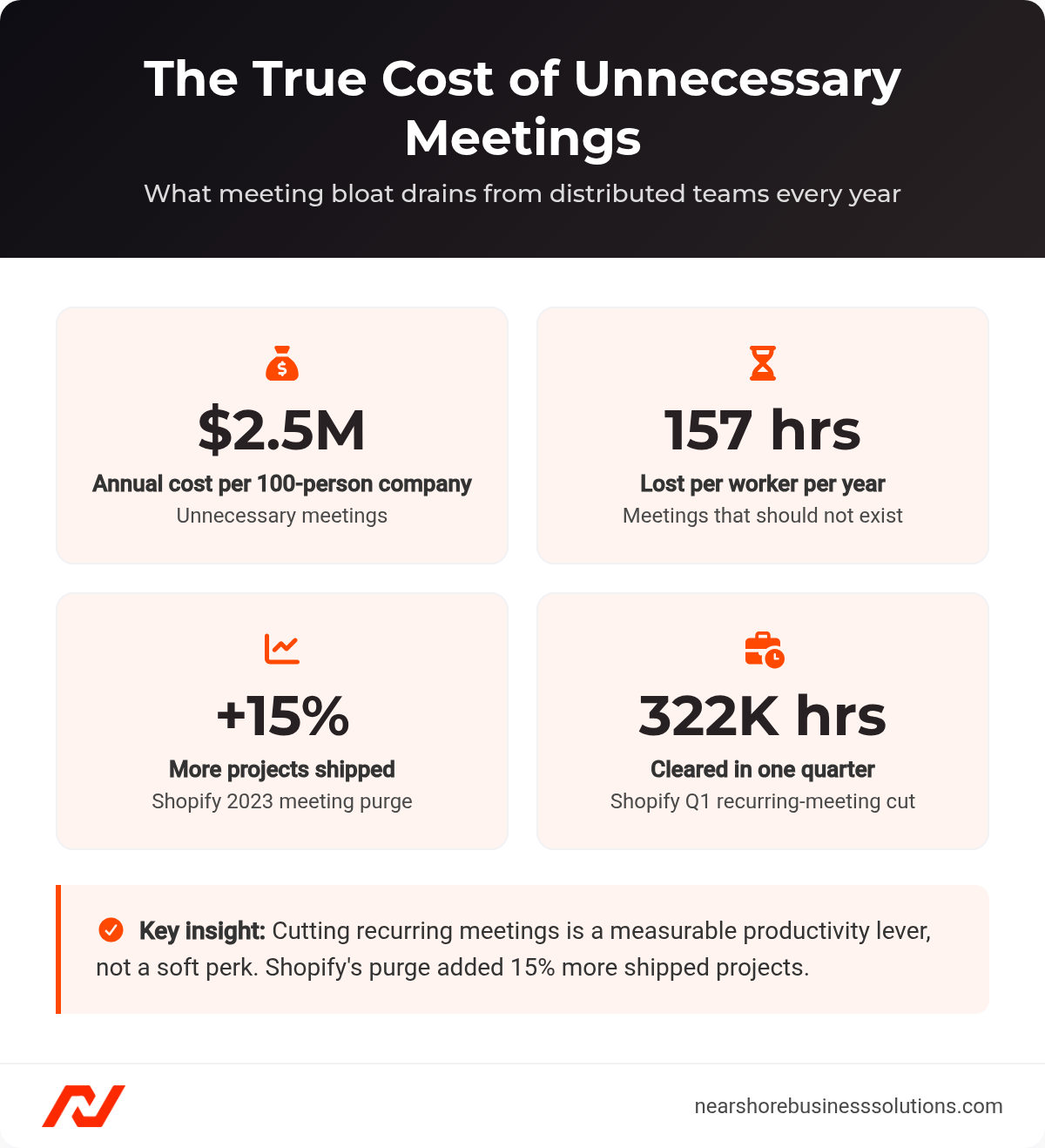
The annual cost of unnecessary meetings and the productivity gains from cutting them.
For US-LATAM teams, meeting waste erodes the nearshore cost advantage. Companies hiring LATAM engineers save 40% to 60% on salary costs compared to major US tech hubs, but that advantage narrows if they import the same meeting-bloated culture. Every unnecessary meeting eliminated returns compounding value: lower per-meeting cost multiplied by higher deep-work output per engineer. For the operational side of distributed leadership, see our guide on how to manage a remote team.
When Should a Topic Be Synchronous Instead of Async?
The biggest etiquette failure happens before anyone joins the call. Most teams default to synchronous meetings for topics that async handles faster, with a richer paper trail and zero calendar cost.
GitLab’s remote handbook is explicit: 80% to 90% of communication should be asynchronous, with sync reserved for relationship-building, urgent problem-solving, and complex coaching. Doist pushes further, reporting that less than 5% of its communication happens in real time. The principle is async by default, sync by exception.
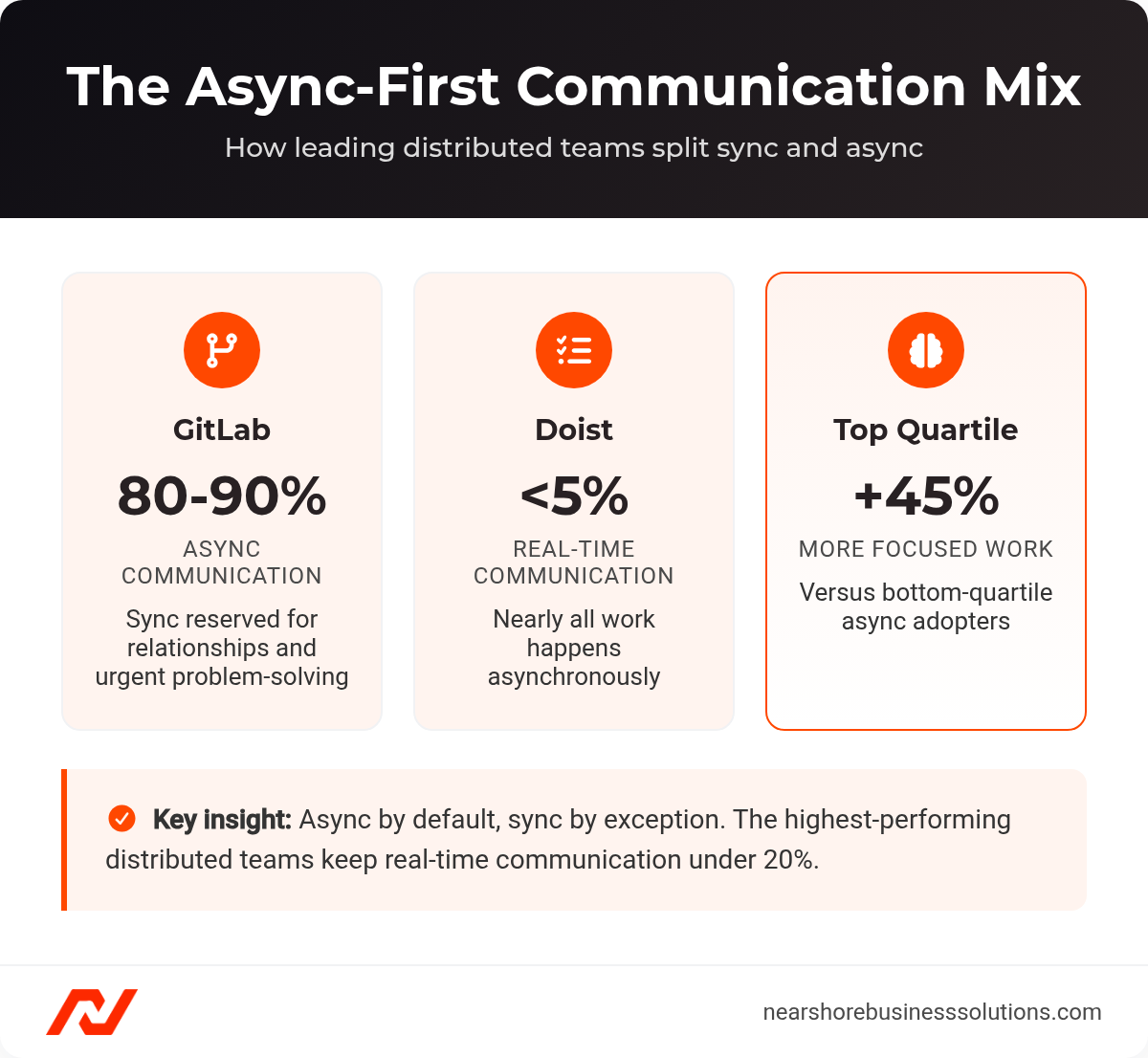
How leading distributed teams split synchronous and asynchronous communication.
US-LATAM teams have a structural reason to adopt this faster. With 4 to 6 hours of daily time zone overlap, an async-first culture transforms that window from “the only time we can do anything” into protected time for the highest-value synchronous collaboration. Non-overlapping hours become deep-work blocks, not dead zones. Research from Atlassian found that teams in the top quartile for async adoption report employees spending 45% more time on focused, strategic work than those in the bottom quartile. Pairing the right remote collaboration tools with these norms is what makes async-first stick.
What Are the Non-Negotiable Video Call Etiquette Rules?
Every enforceable policy covers three phases: before, during, and after the call. Codifying each phase removes ambiguity and gives managers a standard they can hold the whole team to.
What Should Happen Before the Meeting Starts?
Sixty-three percent of meetings have no pre-planned agenda, according to Atlassian survey data, and teams that consistently use agendas report meetings 50% shorter and 70% more effective. Enforce these rules as scheduling prerequisites:
- Apply the Purpose Test. Complete this sentence in the invite: “By the end of this meeting, we will have ___.” If it ends with “discussed” or “caught up on,” it belongs in async.
- Write a structured agenda with time-boxed items. Every item gets a topic, time allocation, and outcome type (Decide / Inform / Brainstorm / Unblock).
- Default to 25 or 50 minutes. Google caps meetings at 50 minutes by default. Parkinson’s Law applies with particular force to meetings.
- Distribute the agenda 24 hours in advance. If you cannot produce one by the deadline, the meeting is not ready.
- Name an owner and a decider. The owner facilitates; the decider holds decision authority. They may not be the same person.
- Limit attendees to decision-makers and direct contributors. Everyone else gets the async recap.
- Attach pre-reads for complex topics. Amazon’s 6-Pager practice, which mandates silent reading before discussion, eliminates the “let me bring everyone up to speed” preamble. For US-LATAM teams, pre-reads level the playing field for non-native English speakers who process written technical English faster than real-time speech.
What Are the Rules During the Call?
In-call discipline is where most etiquette breaks down, so make each expectation explicit rather than assumed.
- Default to mute when not speaking. State this in onboarding materials rather than assuming it.
- Announce before sharing your screen and confirm visibility.
- Use the hand-raise feature as the default question queue. Verbal interruptions create coordination problems that latency makes worse.
- Set camera expectations per meeting type, not as a blanket rule. Research from Arizona State University found that mandatory camera-on policies correlate with emotional exhaustion and reduced participation. When employees choose cameras on, engagement exceeds what mandates produce. Camera-on works for relationship-building (1:1s, retrospectives, onboarding) and high-bandwidth decisions. Camera-optional works for technical reviews, status syncs, and analytical sessions. When requesting cameras on, state the reason in the agenda.
- Actively manage participation equity. Use round-robin on key decisions. For brainstorming, have all participants type ideas into chat simultaneously for 60 seconds before verbal discussion. This surfaces contributions from junior staff and non-native speakers who would not have volunteered them verbally.
- Replace daily standups with async check-ins. Reserve sync standups for blockers only, two to three times per week.
- Time-box each agenda item with a visible timer. When time is hit, the facilitator asks: “Extend by five minutes and cut the next item, or take this to async?”
- End five minutes early. Confirm action items, state decisions reached, and create buffer before the next call.
What Should Happen in the 24 Hours After the Meeting?
The follow-up phase determines whether decisions actually stick, and a 24-hour standard keeps momentum from leaking out.
- Designate a note-taker before the meeting starts. Rotate the role to prevent it defaulting to the most junior person.
- Circulate written action items, with owners and deadlines, within 24 hours. If the meeting did not produce outcomes clear enough to document in a day, it failed its purpose test.
- Record with explicit consent. Comply with the most restrictive jurisdiction on the call. GDPR requires informed consent from all participants, and US two-party consent states (California, Illinois, Florida, and others) require all-party agreement.
- Post a timestamped async recap for absent teammates. Write in clear, jargon-reduced language and avoid idioms. Pair recordings with written summaries so non-native English speakers can cross-reference.
- Give async participants a 24-to-48-hour response window before decisions finalize. State the deadline in both US and LATAM time zones. This prevents the corrosive dynamic where LATAM team members consistently learn about decisions after the fact.
How Should Online Meeting Etiquette Adapt for Multi-Time Zone Teams?
Time zone differences can add 20% to project timelines and increase bug rates by 15%, according to research on distributed engineering teams. US-LATAM teams share 4 to 6 hours of overlap, a structural advantage over offshore arrangements where Bangalore shares 0 to 1.5 hours and Manila shares zero. But temporal proximity only converts to productivity if managed deliberately. For a country-by-country breakdown, see our reference on time zones in South America.
How Do You Rotate Meeting Times Fairly?
Developer burnout rates increase by an estimated 30% when teams have fewer than two hours of daily overlap, per distributed-work research. Even with strong overlap, the same region absorbing early-morning or late-evening calls every week creates chronic fatigue. A rotation model distributes the burden. Map your core sync time to a schedule like this one:
| Day | Meeting Time (UTC) | US Pacific | Bogotá | Buenos Aires | Off-Hours Burden |
|---|---|---|---|---|---|
| Monday | 14:00 | 7:00 AM | 9:00 AM | 11:00 AM | US Pacific (early) |
| Tuesday | 16:00 | 9:00 AM | 11:00 AM | 1:00 PM | No one (core hours) |
| Wednesday | 20:00 | 1:00 PM | 3:00 PM | 5:00 PM | Buenos Aires (late) |
The Tuesday “golden window” hosts the highest-priority sync session. No region takes more than two off-peak slots per week. Track burden per person over rolling 8-week windows, not just per region.
Which Tool Should You Use for Each Meeting Type?
Tool choice should follow the communication type, not the other way around. By market share, Zoom holds roughly 55%, Microsoft Teams roughly 27%, and Google Meet roughly 11%, according to platform market-share tracking. But market share measures adoption, not fitness. Match tools to communication types: scheduled video calls for relationship-building and complex decisions, async video (Loom) for demos and walkthroughs that do not need real-time Q&A, collaborative docs for pre-reads and async deliberation, and issue trackers for engineering coordination. The goal is fewer live meetings, not better-attended ones.
How Do You Turn Meeting Rules Into Lasting Culture?
Meeting etiquette is a proxy for how much an organization respects its people’s time, so the rules only hold when they are built into onboarding and reviewed on a cadence. Embed standards into Day 1 onboarding, not Month 3. Run quarterly “meeting hygiene” retrospectives. Capture baseline metrics (meeting volume per person, average length, deep-work hours), then measure again after 90 days.
Latin America’s developer population is growing at 8% to 10% annually, with over 1.2 million professional software developers across the region, per industry workforce estimates. As US companies manage increasingly distributed teams, meeting culture becomes a scaling concern and a competitive differentiator. Fewer, better meetings signal trust, operational maturity, and respect for autonomy, exactly what top talent evaluates when choosing where to work.
Frequently Asked Questions
How many meetings per week is too many for a software engineer?
There is no universal cap, but the data signals a problem long before most teams notice one. Software engineers already sit through 11 to 15 meetings per week, and Microsoft’s Work Trend Index shows Teams users spending 3x more time in meetings than in early 2020. A practical test is deep-work capacity. If an engineer cannot protect at least three to four uninterrupted hours a day, the calendar is too full and async should absorb the overflow.
Should I require LATAM team members to keep their cameras on?
No. Make camera-on a per-meeting choice tied to the meeting type rather than a blanket mandate. Research from Arizona State University found that mandatory camera-on policies correlate with emotional exhaustion and reduced participation, while engagement is higher when employees choose to turn cameras on. Reserve camera-on for relationship-building and high-bandwidth decisions, keep it optional for technical reviews and status syncs, and state the reason in the agenda whenever you do request it.
How do we run meetings that include non-native English speakers fairly?
Lean on written communication so language never becomes a participation barrier. Attach pre-reads for complex topics, since non-native English speakers process written technical English faster than real-time speech, and use the type-ideas-into-chat technique to surface contributions before verbal discussion begins. After the call, post a timestamped recap in clear, jargon-reduced language and pair recordings with written summaries so people can cross-reference at their own pace.
What is the minimum time zone overlap needed for a distributed team to collaborate well?
Roughly four hours of daily overlap is the working sweet spot, and US-LATAM teams sit comfortably above it with 4 to 6 hours. That window matters because too little overlap is costly. Distributed-engineering research ties insufficient overlap to project timelines stretching by up to 20%, bug rates rising 15%, and developer burnout climbing an estimated 30% when teams have fewer than two hours of shared time. The advantage only pays off if you reserve the overlap for high-value sync work rather than routine status updates.
Do we need everyone’s consent before recording a meeting?
Yes, and you should comply with the most restrictive jurisdiction represented on the call. GDPR requires informed consent from all participants, and US two-party consent states such as California, Illinois, and Florida require agreement from everyone present. State the recording intent up front, capture explicit consent, and default to all-party agreement so a single attendee’s location does not create legal exposure for the whole team.
Ready to Build a Distributed Team That Runs on Better Meetings?
Nearshore Business Solutions sources and vets engineers across Latin America who already work in US time zones and US work styles. We screen for technical skill, English fluency, and the async-first communication habits that make distributed meeting culture work from Day 1.
Every placement includes a 90-day replacement guarantee, and our staff augmentation and employer of record in Latin America services handle vetting, compliance, and payroll so you can focus on the work.
Book a consultation to scope your nearshore engineering team and get a custom hiring plan.