
Why Are Operations Teams Replacing Their Business Process Automation Tools in 2026?
Operations teams are not switching tools because better software exists. They are switching because their current deployments fail at a 50% rate, and the root causes are structural, not technical. EY’s 2023 data isolates four organizational failures driving replacement cycles, three of which have nothing to do with the platform itself.
The pattern matters for any operations director planning a 2026 budget. The tooling decision is the easy part. The hard part is matching tool tier to process complexity and staffing the technical roles each platform demands. This guide breaks down the measurable cost of manual work, compares the top five process automation software platforms, and maps a 90-day rollout that proves ROI before you scale.
The Measurable Cost of Manual Workflows: FTE Waste, Error Rates, and Hidden Overhead
The average knowledge worker loses 69 days per year to administrative tasks, roughly 5.5 hours every week spent on work that generates zero strategic value (McKinsey Global Institute, 2017). Salesforce’s 2023 data sharpens the picture. Employees burn 3.6 hours per day on automatable tasks like searching for information, entering data, and managing email. Scale that across a 50-person operations team, and you fund the equivalent of 18 full-time employees doing work a machine handles faster and without errors.
McKinsey estimates that current technologies could automate 45% of the activities people are paid to perform. That is not 45% of jobs, but 45% of discrete tasks within virtually every role. The gap between what automation can handle and what most companies actually automate represents direct margin leakage.
Specific functions already prove the math. Automation in Accounts Payable cuts invoice processing costs by up to 80% and compresses cycle times from weeks to days (IOFM, 2023). In IT operations, automated systems resolve 40-60% of Level 1 support tickets without human intervention (Gartner, 2023).
Why 2024-Era RPA Deployments Are Already Failing Operations Teams
Half of all RPA programs will fail to achieve their intended ROI through 2025, according to Gartner. The cause is not that the technology underperforms. Organizations deploy it against the wrong problems with the wrong governance structures.
EY’s 2023 Global RPA Survey isolates four root causes:
- Poor process selection and understanding (41%): Teams automate broken or inefficient processes, encoding waste into software instead of eliminating it.
- Lack of skilled talent (35%): Organizations cannot hire or train the staff needed to build, manage, and iterate on automation workflows.
- Inadequate IT infrastructure and governance (28%): Tool sprawl proliferates without a central strategy, creating fragile integrations and shadow automation.
- Unrealistic expectations (22%): Leadership treats automation as a one-time deployment rather than an ongoing program requiring continuous optimization.
Only one of these four failures is technical. The other three are human-capital and governance problems. That distribution is the single most important insight for budgeting a 2026 automation program.
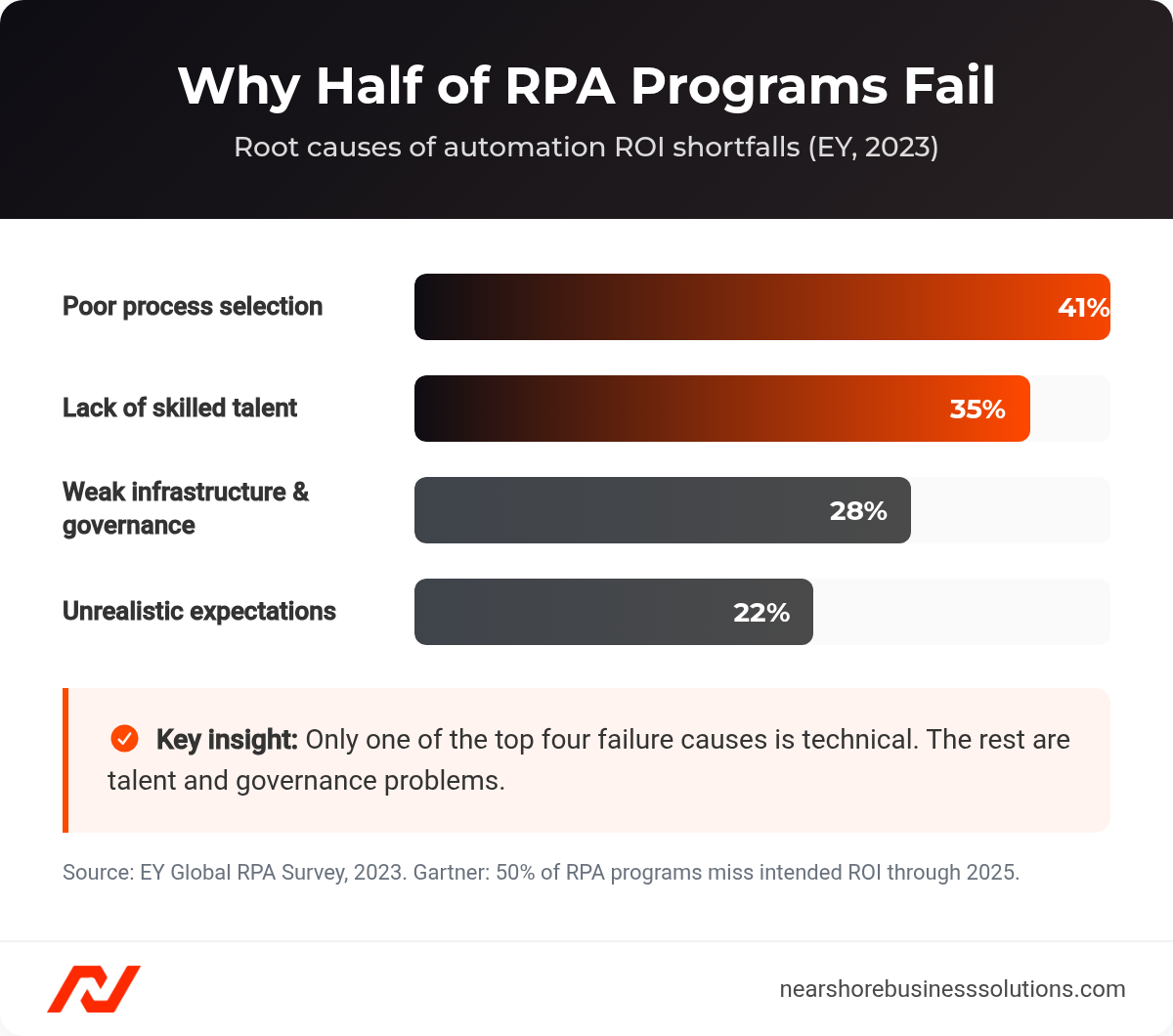
Why half of RPA programs miss their ROI, ranked by root cause (EY, 2023).
The Build-vs.-Buy-vs.-Staff Decision Framework Every Operations Director Needs
Every $1 in software licenses triggers $3 to $5 in implementation and management costs within the first 18 months (Deloitte, 2023). A realistic TCO model for a mid-market company:
| Cost Category | Estimated Range (Mid-Market, $20M ARR) |
|---|---|
| Licensing | $10,000–$50,000/year |
| Implementation | $20,000–$100,000 (one-time) |
| Skilled Staffing (Internal or Contract) | $90,000–$150,000/year (one dedicated Automation Engineer/Developer) |
| Maintenance & Infrastructure | $5,000–$15,000/year |
| Estimated Year 1 TCO | $125,000–$315,000+ |
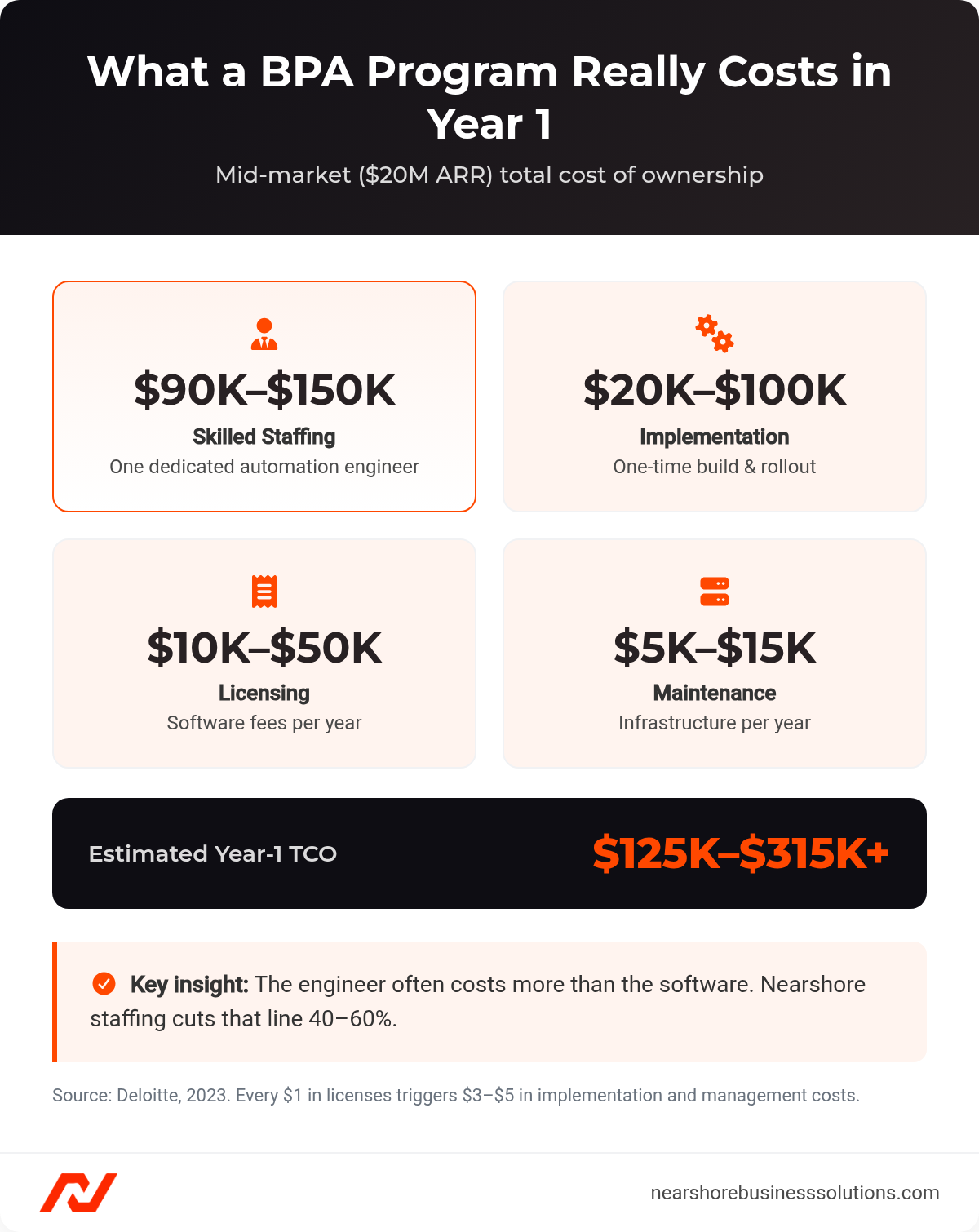
Year-1 BPA total cost of ownership for a mid-market company (Deloitte, 2023).
The $90K to $150K line item for a single automation engineer often exceeds the software cost itself. The 35% talent-gap failure rate from EY’s data confirms that this role is both critical and hard to fill. Demand for “Automation Engineers” grew by 57% year-over-year in 2023 (LinkedIn, “2024 Jobs on the Rise”), further tightening the market.
This is where many operations leaders quietly stall. The software is approved, but the dedicated engineer who builds and maintains the workflows is stuck in a hiring queue. One increasingly common answer is to source that role through nearshore staff augmentation, which places vetted automation engineers from Latin America in same-timezone roles at 40-60% below US salary rates. That shifts the build-vs-buy-vs-staff decision: instead of waiting months for a domestic hire, teams add capacity in under 30 days, with first vetted candidates within 3 business days.
Companies that get the full equation right (tooling, implementation, and dedicated engineering talent) report average ROI of 250% to 400%, with payback periods between 6 and 9 months for straightforward workflows and 12 to 18 months for complex, multi-system projects (Deloitte, 2023).
What Separates Enterprise-Grade BPA Tools from Lightweight Workflow Automation Tools?
The line between a $30/month workflow connector and a $200,000 enterprise platform is not features. It is scope: how many departments, systems, and human decision points a single automation has to span. Getting that scope assessment right determines which tier of tool actually fits.
Task Automation vs. End-to-End Process Orchestration: Where Each Tier Delivers ROI
Adoption is no longer the differentiator. 72% of mid-market organizations (100-999 employees) now run at least one workflow automation or BPA solution, up from 57% in 2022 (Camunda, “The State of Process Orchestration 2024”). The differentiator is which tier of automation a company deploys.
| Tier | Definition | Core Question It Answers | Typical Timeline |
|---|---|---|---|
| Workflow Automation | Linear task sequences within a single department | “When X happens, do Y and Z” | 1–5 days |
| Business Process Automation (BPA) | End-to-end processes spanning multiple departments, systems, and human decision points | “How do we redesign our entire customer onboarding process?” | 4–8 weeks |
| Enterprise Process Orchestration | Full-stack automation including process mining, RPA, AI/ML, and cross-functional orchestration | “How do we automate our entire order-to-cash process?” | 3–6 months |
The broader BPA market reached $14.21 billion in 2023 and is projected to hit $40.33 billion by 2032 at a 12.2% CAGR (Fortune Business Insights, 2024). The RPA market stands at $3.2 billion but is projected to grow at 39.9% CAGR to $53.1 billion by 2032 (Precedence Research, 2024), driven by the persistence of legacy systems that refuse to die.
RPA becomes necessary when processes involve desktop applications, mainframes, or healthcare EHRs that lack modern APIs. A mid-market company running a 15-year-old ERP with no REST API cannot use Zapier to extract purchase order data. It needs a bot that navigates the desktop interface. If 80%+ of your stack is cloud-native with mature, well-documented APIs, an API-first BPA tool delivers faster time-to-value with lower maintenance.
Integration Depth: How API-First Tools Outperform Platform-Locked Ecosystems
Platform-locked tools, such as automation embedded within Salesforce Flow, HubSpot Workflows, or ServiceNow, optimize for in-platform processes. The moment a workflow reaches outside the ecosystem, limitations surface. API-first tools (Zapier, Make, Workato) exist to connect different systems.
Three costs emerge from platform lock-in that operations leaders underestimate. The first is migration cost when switching vendors: a 50-workflow Salesforce Flow deployment represents $30,000 to $60,000 in rebuild costs alone. The second is integration fragility at ecosystem boundaries. The third is compounding switching costs that distort future vendor decisions. The decision framework is simple. If 80%+ of a workflow’s touchpoints live within a single platform, use native automation. If the workflow crosses three or more systems, invest in an API-first orchestration layer.
How Do the Top 5 Process Automation Software Platforms Compare on Cost, Speed, and Scalability?
The five platforms below cover every realistic mid-market scenario, from a marketing team connecting two SaaS apps to a finance org automating a legacy ERP. The column that should drive the decision is not price. It is “Key Human Roles Required,” because the staffing delta between platforms is what determines whether a tool delivers ROI or becomes shelfware.
| Tool | Best For | Starting Price | Integrations | Complexity | Key Human Roles Required | Key Result |
|---|---|---|---|---|---|---|
| Zapier | Non-technical teams | Free; Starter $29.99/mo | 7,000+ | Low (1–5 days) | Workflow Designer, Administrator | Instacart: 60% of IT requests automated, 1,000 hrs/month saved |
| Make | Visual process design at scale | Free; Core $10.59/mo | 1,500+ (deeper API access) | Low–Medium | Automation Specialist, API Specialist | DocuSign: onboarding cut from 3 days to 5 minutes |
| UiPath | Legacy, compliance-driven automation | ~$420/mo per bot; enterprise $50K–$200K+/yr | Full-stack | High (3–6 months) | RPA Developer, Solutions Architect, BA, CoE Manager, Infra Engineer | Canva: 40 hrs/month to 20 minutes, 100% accuracy |
| Power Automate | Microsoft-native organizations | $15/user/month | 1,000+ | Medium (4–8 weeks) | Power Platform Developer, BA, Citizen Developer | Toyota: 400+ processes, 120,000 hours saved annually |
| n8n | Engineering-led teams, data sovereignty | Free (self-hosted); Cloud $20/mo | 400+ (custom via JS/TS) | Medium (requires coding) | Integration Developer, DevOps Engineer | Deutsche Telekom (user); 5–10 hrs/week saved on pipelines |
The “Key Human Roles Required” column carries more decision weight than price. Zapier requires one competent workflow designer. UiPath requires five distinct roles. That staffing delta determines whether a platform delivers ROI or becomes shelfware.
Zapier: Speed Without Engineering Dependencies
Zapier’s 7,000+ pre-built integrations make it the fastest path from concept to production for straightforward workflows. Instacart automated 60% of common IT requests, reduced ticket resolution time by 75%, and recovered 1,000 employee hours per month (Zapier, 2023). Clearbit automated enrichment and routing of 15,000+ inbound leads per month, dropping handoff time to under 1 minute with 99.9% data consistency (Zapier, 2023). Zapier’s task-volume pricing model favors moderate-volume workflows but punishes high-throughput operations. At 50,000+ tasks per month, costs push past $800/month, where Make often delivers identical throughput at 40-60% lower cost.
Make: Visual Complexity at a Lower Cost Ceiling
Make frequently exposes 30 to 50+ actions per application, where Zapier exposes 10 to 15, including advanced filtering, pagination, and custom API module builders. Make’s scenario builder uses routers, iterators, and error-handling modules that handle natively what Zapier requires workarounds to achieve. DocuSign compressed partner onboarding from 3 days to under 5 minutes, eliminated 100% of manual data entry for partner records, and recovered 30 hours per week, built by a Sales Operations Manager, not a developer (Make.com, 2022). Make serves over 500,000 users worldwide.
UiPath: Full-Stack Automation for Legacy-Heavy Operations
UiPath holds $1.41 billion in ARR with 36% RPA market share (IDC, 2023), making it the default enterprise choice. Forrester’s Total Economic Impact study found 471% ROI over three years with payback under 6 months, driven by $7.5 million in labor savings and $2.1 million in error reduction (Forrester, 2023). Canva reduced intercompany transaction processing from 40 hours/month to 20 minutes at 100% accuracy (UiPath, 2023). Chevron automated over 100 processes in finance and IT, achieving $10 million in annual savings and freeing 200,000 employee hours. A functioning UiPath Center of Excellence requires five roles minimum, adding $600,000 to $900,000 in annual domestic labor costs before a single bot runs. That labor line is exactly where a nearshore IT staffing model changes the economics, sourcing RPA developers and solutions architects from Latin America at a fraction of US rates while keeping same-timezone overlap for a Center of Excellence.
Power Automate: The Default Choice Inside Microsoft-Centric Organizations
Microsoft reports that 97% of Fortune 500 companies use the Power Platform, with more than 33 million monthly active users as of 2023 (Microsoft, FY23 disclosures). Toyota built 400+ automated processes saving 120,000 hours annually using a federated model: a central CoE established governance while departments built their own flows. Yelp compressed monthly budget variance reporting from 2 weeks to 2 days, freeing 40 hours per analyst per month (Microsoft Customer Stories, 2023). Power Automate’s citizen-developer model reduces but does not eliminate the need for dedicated technical talent. Desktop flows, custom connectors, and complex integrations still require a Power Platform developer.
n8n: Open-Source Control for Engineering-Led Teams
n8n’s 40,000+ GitHub stars make it one of the most actively developed open-source automation tools. It occupies a niche neither Zapier nor UiPath serves: engineering-led back-office automation with full data sovereignty. The core product is free when self-hosted, with 400+ integrations and custom connectors in JavaScript/TypeScript. It is best for DevOps automation, data pipeline orchestration, and internal tool integration, especially under SOC 2, GDPR, or HIPAA data-residency requirements. The limitation is staffing. n8n requires engineering resources to deploy and maintain. Companies without at least one DevOps engineer owning the instance will see reliability degrade within 90 days.
When Do Business Process Automation Tools Fail, and How Do High-Performing Teams Prevent It?
Most BPA failures trace to three repeatable mistakes, and each has a known prevention. High-performing teams treat automation as a program with dedicated owners, not a one-time software purchase.
Failure Mode 1: Automating Broken Processes. The 41% failure rate from poor process selection means the fix is process audit and redesign before any tool is selected. UiPath’s process mining capabilities exist specifically to discover automation opportunities before building anything.
Failure Mode 2: The Myth of Full Automation. BPA shifts staffing needs rather than eliminating them. A large insurance company implemented RPA for claims processing. Rather than cutting headcount, they retrained processors to handle complex exceptions and identify new automation opportunities. The result was a 30% increase in claims processed with the same headcount and a 15% improvement in customer satisfaction (McKinsey, 2022). The World Economic Forum projects that while 85 million jobs may be displaced by automation, 97 million new roles will emerge adapted to the human-machine division of labor.
Failure Mode 3: Talent Gaps and Change Management. The 35% talent-gap failure rate demands investment in training and role creation from day one. The World Economic Forum’s 2023 Future of Jobs Report confirms that roles like Process Automation Specialists and Business Intelligence Analysts are among the fastest-growing. The people who make automation work are becoming more valuable, not less.
What Does a 90-Day BPA Roadmap Look Like for Operations Directors Starting in 2026?
A disciplined 90-day rollout follows three steps: audit the process landscape, match tool tier to process tier, then staff the gap before scaling. Companies that validate a single workflow before attempting enterprise-wide orchestration account for far fewer of the 50% failures.
Step 1: Audit your process landscape. Count the systems, decision branches, and exception-handling paths in each target workflow. The highest ROI comes from automating processes that are high-volume, repetitive, rules-based, and prone to human error. Workflows touching 3 or fewer cloud-native apps with linear logic point toward Zapier or Make. Workflows spanning 4+ systems with conditional routing require Power Automate or UiPath.
Step 2: Match tool tier to process tier.
| Process Tier | Complexity | Recommended Tool(s) | Use Cases | Timeline |
|---|---|---|---|---|
| Cloud-App Connectivity | Low | Zapier, Make | Marketing, sales, support tool connections | 1–5 days |
| Microsoft Ecosystem | Medium | Power Automate | Teams, SharePoint, Dynamics 365 workflows | 4–8 weeks |
| Technical Back-Office | Medium | n8n | DevOps, data pipelines, internal integrations | Days to weeks |
| Legacy / Document-Heavy | High | UiPath | Desktop apps, mainframes, invoice processing | 3–6 months |
Step 3: Staff the gap. Map the “Key Human Roles Required” from the comparison table against your current headcount. Every unfilled role adds 3 to 6 months to time-to-value. Start with one high-volume, low-complexity workflow to prove ROI within 30 to 60 days, then use that result to fund expansion. Companies that attempt enterprise-wide orchestration before validating a single workflow account for a disproportionate share of the 50% failure rate.
Frequently Asked Questions
What is the difference between RPA and BPA?
Business process automation (BPA) redesigns an entire end-to-end process across multiple departments, systems, and human decision points, while robotic process automation (RPA) deploys software bots that mimic human clicks inside applications that lack modern APIs. You reach for RPA when a process touches desktop apps, mainframes, or legacy ERPs with no REST API, and for API-first BPA when your stack is mostly cloud-native. The two often work together: a full enterprise orchestration includes process mining, RPA, and AI, with the broader BPA market at $14.21 billion versus $3.2 billion for RPA alone (Fortune Business Insights, 2024; Precedence Research, 2024).
How long does a typical BPA implementation take?
Timeline scales directly with process complexity, not with company size. A linear workflow connecting a few cloud apps through Zapier or Make ships in 1 to 5 days, a Microsoft-ecosystem or multi-system BPA build in Power Automate runs 4 to 8 weeks, and a full enterprise orchestration with UiPath takes 3 to 6 months. Every unfilled technical role adds another 3 to 6 months to time-to-value, which is why staffing the gap matters as much as picking the tool.
Can I start with a free BPA tool, or do I need a paid plan?
Most leading platforms offer a genuine free tier that is enough to validate a single low-complexity workflow before you spend anything. Zapier, Make, and n8n (self-hosted) are all free to start, so you can prove ROI on one high-volume, repetitive process in 30 to 60 days and use that result to fund expansion. The cost that surprises operations leaders is not licensing but staffing: every $1 in software licenses triggers $3 to $5 in implementation and management costs within the first 18 months (Deloitte, 2023).
Do I need to hire a full-time automation engineer, or can I use a contractor?
A dedicated engineer who builds and maintains workflows is the single line item that most often stalls an approved program, because that role runs $90,000 to $150,000 per year and demand for automation engineers grew 57% year over year in 2023 (Deloitte, 2023; LinkedIn, 2024). Many teams skip the multi-month domestic hiring queue by sourcing the role through nearshore staff augmentation, which places vetted engineers in same-timezone roles at 40 to 60% below US rates, with first candidates within 3 business days and placement within 30 days. The right answer depends on whether automation is an ongoing program, which it almost always is, in which case sustained engineering ownership beats a one-time contract.
Which processes should I automate first for the highest ROI?
Start with workflows that are high-volume, repetitive, rules-based, and prone to human error, since those return value fastest and carry the least risk. Accounts payable is a classic first target: automation cuts invoice processing costs by up to 80% and compresses cycle times from weeks to days (IOFM, 2023). Avoid automating a broken process, because poor process selection is the number one cause of failed programs at 41%, so audit and redesign the workflow before you select a tool (EY, 2023).
How Do You Staff the Automation Roles Your BPA Program Actually Needs?
The fastest way to fund an automation program is to close the talent gap that causes 35% of failures, not to buy more software. Nearshore Business Solutions sources and vets automation engineers, RPA developers, Power Platform developers, and DevOps engineers from across Latin America, screened for technical skill, English fluency, and US work-style fit.
Every placement works in your timezone at 40-60% below US salary rates, and you receive your first pre-vetted candidates within 3 business days rather than the 3 to 6 months a domestic automation hire typically takes. That timeline is often the difference between a 2026 program that proves ROI in its first quarter and one that stalls before a single workflow ships.
Get a free consultation to scope the automation roles your BPA stack requires and receive a custom staffing plan.